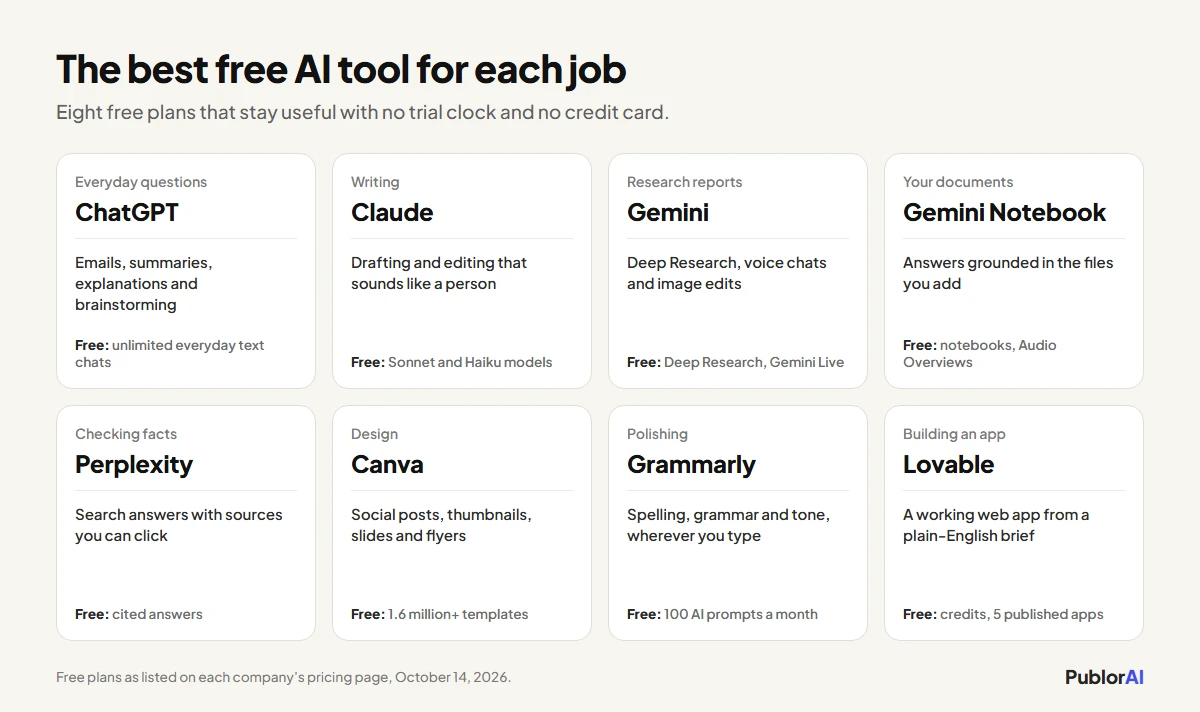
The best free AI tools in 2026 are ChatGPT and Claude for everyday questions and writing, Gemini Notebook for working through your own documents, Perplexity for research you can check, Canva for design, Grammarly for polishing, and Lovable if you want to build a small app. I picked them on three tests: the free plan has to be useful for real work with no trial clock running, it can’t ask for a credit card, and each tool has to do one job better than the others on this list. Free plans also got noticeably better this year. ChatGPT made everyday text chat unlimited in August, and Google’s free Gemini plan now includes Deep Research and its Notebook research assistant. My short version: start with ChatGPT or Claude, add Gemini Notebook if you read a lot, and open Canva the first time you need a graphic.
How I Picked These
Every tool here passed the same three tests, and plenty of popular names didn’t.
- Free means free. No 7-day trial and no credit card at sign-up. A free plan can have limits, but it has to stay useful once you reach them.
- Good enough for real work. The free plan has to handle a task you’d otherwise pay for or spend an hour on, not just a demo.
- One clear job. Each tool earns its place by doing one thing better than the rest of the list, so you can pick by need instead of trying all eight.
Plan details come from each company’s own pricing pages on October 14, 2026. They change often, so check before you rely on a specific limit.
The 8 Best Free AI Tools in 2026
1. ChatGPT: Best All-Rounder
ChatGPT is still the one I’d open first for everyday questions, emails, summaries and quick explanations, and its free plan got a lot more generous this year. Since August 2026 everyday text chat on the free plan has been unlimited, subject to OpenAI’s abuse safeguards, and it runs on Luna, OpenAI’s fastest model, with a Think option for harder questions.
What’s free: unlimited everyday text chats, plus limited file uploads, image creation, voice chats and deep research. Free users may see ads in some countries, including the US.
Best for: writing help, explanations, brainstorming and everyday questions.
The catch: one conversation holds about 12 pages of input, and the stronger GPT-6 thinking levels are paid only. Our ChatGPT Plus vs Free guide covers when the $20 upgrade is worth it.
2. Claude: Best Free Writing Partner
Claude’s free plan is the one I’d pick for writing that needs to sound like a person, and for careful, longer explanations. It runs Anthropic’s Sonnet and Haiku models, and Sonnet is a strong writer even without the paid Opus model.
What’s free: chats with Sonnet and Haiku, with usage that resets every five hours and a weekly cap on top.
Best for: drafting and editing, long explanations, and writing in a consistent tone.
The catch: heavy sessions use the five-hour allowance quickly, and Claude Code isn’t on the free plan. Our guide to Claude’s usage limits explains how far each plan goes.
3. Gemini: The Most Packed Free Plan
Google’s Gemini app has the most features of any free plan on this list. According to Google’s plans page, the free tier includes its Flash-Lite model, image creation and editing, Deep Research, Gemini Live voice conversations, Canvas for drafting documents and code, custom Gems, and limited access to Google’s Flow studio for creating video scenes.
What’s free: everything above, plus 15 GB of Google storage.
Best for: research reports, talking an idea through out loud, and quick image edits.
The catch: the free plan runs Google’s lightest model, and the stronger Flash and Pro models need a paid Google AI plan.
4. Gemini Notebook: Best for Your Own Documents
Gemini Notebook, the product Google used to call NotebookLM, is the free tool I’d recommend to students and anyone who reads a lot. You add your own sources, such as PDFs, notes or articles, and every answer is grounded in what you gave it rather than the open web. It can also turn those sources into an Audio Overview you can listen to, or into a slide deck.
What’s free: notebooks, grounded answers and Audio Overviews with a free Google account. Google says it doesn’t use individuals’ notebook data for training unless you send feedback.
Best for: studying, research summaries and making sense of long documents.
The catch: it only knows what you give it. That’s the point, but it isn’t a general chatbot.
5. Perplexity: Best for Research You Can Check
Perplexity answers questions like a search engine that writes, and every answer comes with inline citations you can click to check. That makes it the free tool I trust most for facts, prices and anything I’d have to defend later.
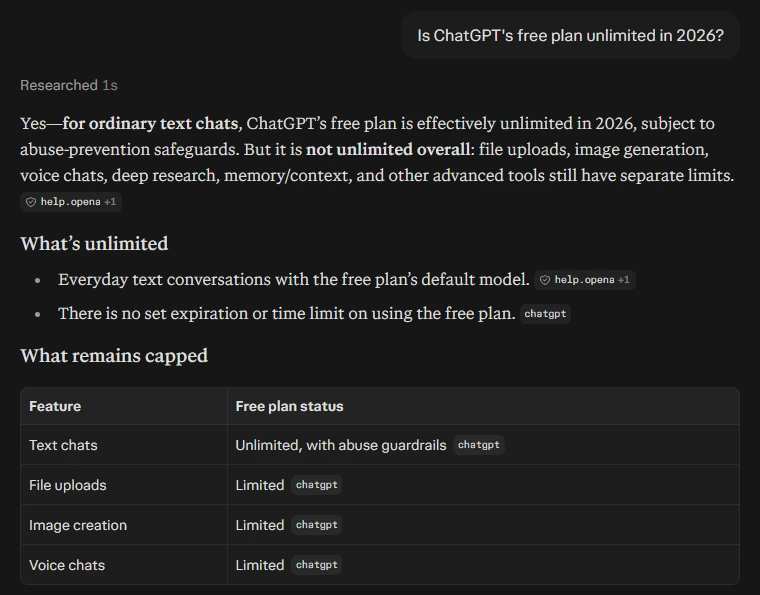
A real answer from Perplexity’s free plan, captured on October 14, 2026: the question, the cited answer, and the table of what stays limited.
What’s free: cited answers using Perplexity’s standard models, with tighter limits than the paid plan.
Best for: research, fact-checking and comparing sources.
The catch: model choice, deep research and higher limits are on Pro, which costs $20 a month, or $17 a month billed yearly.
6. Canva: Best for Design
Canva is still the easiest way to make a social post, a thumbnail, a slide deck or a flyer without a designer, and its free plan is huge: more than 1.6 million templates and 4.7 million stock photos, graphics, videos and audio files, according to Canva’s pricing page.
What’s free: the editor, those templates and stock assets, and a small AI allowance shared across Canva’s AI tools.
Best for: social graphics, thumbnails, presentations and simple brand assets.
The catch: the AI allowance runs out fast, and the premium templates and assets need Canva Pro.
7. Grammarly: Best for Polishing Your Writing
Grammarly catches the spelling, grammar and tone problems that slip past everyone, and it works in your browser and most of the apps you already write in.
What’s free: spelling and grammar corrections, tone detection, and 100 AI prompts a month, according to Grammarly’s plans page.
Best for: emails, essays, and anything you’d be embarrassed to send with a typo in it.
The catch: full-sentence rewrites, tone adjustments, plagiarism checks and AI-text detection need Pro, from $12 a month.
8. Lovable: Best for Building a Small App Without Code
Lovable turns a plain-English description into a working web app, which makes it the free tool to try if you have an idea for a simple tool, a landing page or a prototype and no developer.
What’s free: free credit grants, private projects, unlimited collaborators and up to five apps on lovable.app addresses, with no credit card needed, according to Lovable’s pricing page.
Best for: prototypes, simple internal tools and testing an idea before you pay a developer.
The catch: the free credits go quickly on anything complex, and custom domains need Pro at $25 a month.
Quick Comparison
| Tool | Best for | Free plan highlight | Paid plans from |
|---|---|---|---|
| ChatGPT | Everyday questions and writing | Unlimited everyday text chats | $8 a month (Go) |
| Claude | Writing and long explanations | Sonnet and Haiku models | $20 a month (Pro) |
| Gemini | Research reports and voice | Deep Research, Gemini Live | Paid Google AI plans |
| Gemini Notebook | Your own documents | Grounded answers, Audio Overviews | Paid Google AI plans |
| Perplexity | Research with sources | Cited answers | $20 a month (Pro) |
| Canva | Design | 1.6 million+ templates | Canva Pro |
| Grammarly | Polishing writing | Grammar, tone, 100 AI prompts | $12 a month (Pro) |
| Lovable | Building small apps | Free credits, 5 published apps | $25 a month (Pro) |
Which Free AI Tool to Start With
Pick by the job in front of you, not by the list. These pairings cover most people:
- If you write a lot: Claude for drafting, Grammarly for the final pass.
- If you study or read long documents: Gemini Notebook, with ChatGPT for quick questions.
- If you research for work: Perplexity for anything you need to cite, Gemini for longer Deep Research reports.
- If you make content: ChatGPT or Claude for scripts and captions, Canva for the visuals.
- If you have an app idea: ChatGPT to plan it, Lovable to build the first version.
- If you want to earn with these tools: our guide to making money with AI shows which skills pay, and AI side hustles covers ten specific paths.
What I Left Off This List
A few popular tools didn’t make it, and it’s worth saying why.
- AI video generators. Free AI video is still mostly short trials and watermarked clips. If you want to try it anyway, Gemini’s free plan includes limited access to Google’s Flow studio.
- Design tools inside paid AI plans. Anthropic’s Claude Design, for example, only comes with paid Claude plans.
- Separate AI image apps. ChatGPT and Gemini both create and edit images on their free plans, which covers most people without another account.
- Single-purpose copywriting tools. For product descriptions and captions, the free plans of ChatGPT and Claude do the same job without a monthly word cap.
Free AI Tools: Quick Answers
Are these AI tools really free?
Yes. All eight have a free plan with no time limit and no credit card at sign-up. Each has usage limits and sells a paid upgrade, but the free plans stay useful once you reach those limits.
Which free AI tool is best for a complete beginner?
ChatGPT, because it handles the widest range of everyday tasks and its free plan no longer caps everyday text chat. If you’re new to AI entirely, our plain-English guide to what AI is is a good first read.
Is it safe to put my work into free AI tools?
Treat anything you type into a free AI tool as something the company could store. ChatGPT, Claude and Gemini all let you limit how your chats are used for training in their settings, and Gemini Notebook says it doesn’t train on individuals’ notebooks unless you send feedback. Either way, our list of things you should never tell ChatGPT applies to all of them.
The Bottom Line
The best free AI tools in 2026 are good enough that most people never need to pay. Pick one tool for the job in front of you, learn it properly, and add the next one only when you hit a real wall. Whichever you choose, the skill that makes all of them better is prompting, and our guide to writing better AI prompts covers it in seven rules.