Claude error messages tell you more than they seem to: the wording says whether the problem is Claude’s, your connection’s, your plan’s or your chat’s, and that decides whether you should wait, refresh or change something. I sorted 22 of them into six groups by cause, using Anthropic’s help center where it documents a message and the exact wording people paste into Google where it doesn’t. The one people search for most, “Checking for a response to your message. If Claude is still working on it, you’ll see it here,” means the app lost track of the reply while Claude may still be writing it, so the right move is to wait a minute and refresh, not to send your message again. Short version: “busy”, “capacity” or “unavailable” means wait, a reset time means a usage limit, “length limit” means the chat is too big, and anything about your browser or login is yours to fix.
The Six Kinds of Claude Error Messages
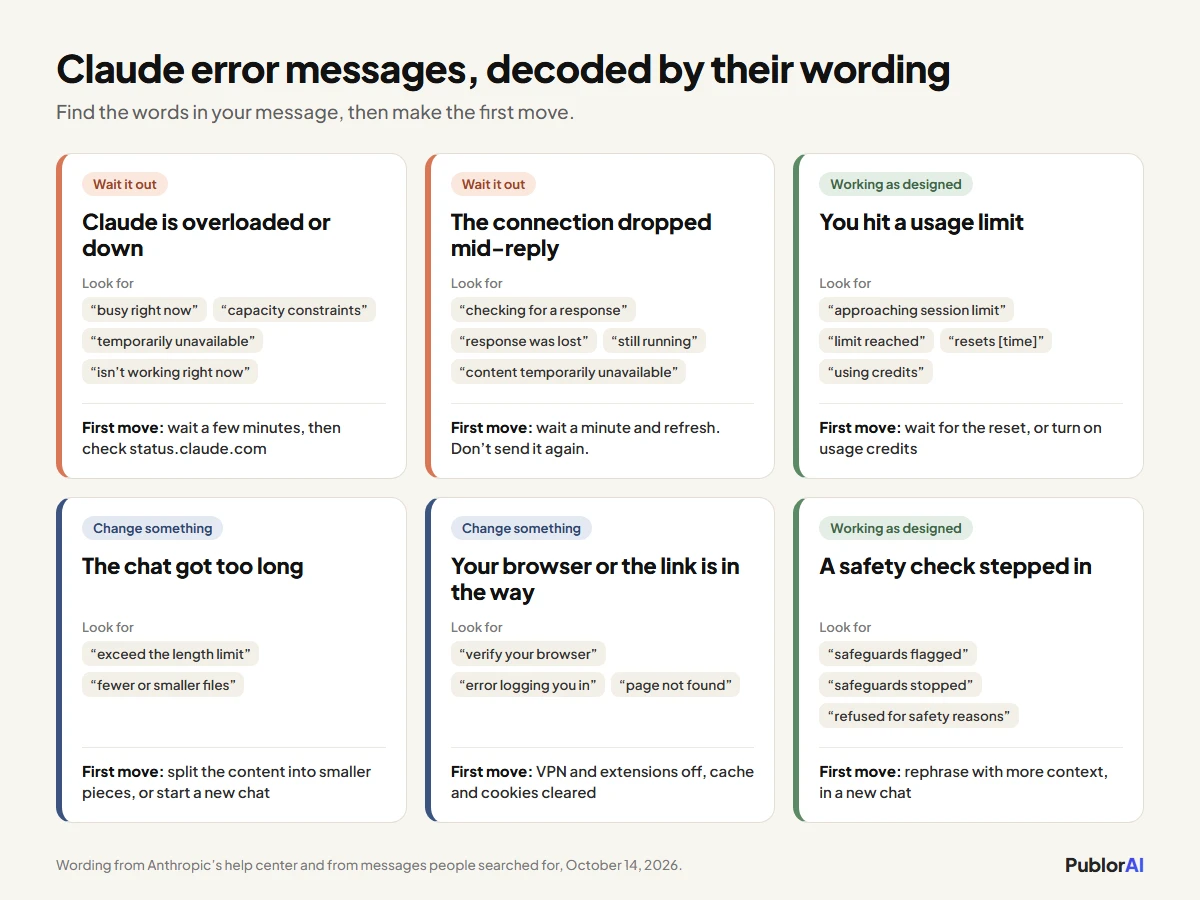
Every message in this guide fits one of six groups, and the group tells you what to do before you’ve read another word. Here they are, with the first move for each:
- Claude is overloaded or down: wait a few minutes, then check Claude’s status page.
- The connection dropped mid-reply: wait a minute and refresh, because Claude may still be answering.
- You hit a usage limit: wait for the reset time in the message, or turn on usage credits.
- The chat got too long: split what you’re sending, or start a new chat.
- Your browser or a link is in the way: turn off your VPN and extensions, clear the cache, or check the link.
- A safety check stepped in: rephrase with more context, ideally in a new chat.
Each message is quoted in full below under its group, so you can search this page for the exact words on your screen. And if yours isn’t here, the wording usually still gives its group away:
How I Sorted These
I grouped these Claude error messages by what causes them, because the cause decides the fix, and two messages that look alike can need opposite responses. “Retrying automatically” asks you to wait. “Your message will exceed the length limit” asks you to change something, and waiting does nothing for it.
- Documented messages are quoted from Anthropic’s help article Troubleshoot Claude error messages, which covers the usage, length, login and capacity messages.
- Undocumented messages come from the searches that bring people to this site, where they paste the text off their screens into Google. Anthropic doesn’t explain these anywhere I could find, so each entry says so, then sticks to what the wording itself tells you and a fix that’s safe either way.
- Every entry ends with whose problem it is and the first thing to try, because that’s the decision you’re actually making.
The demand is real. In this site’s Search Console data for the three months to October 14, 2026, our pages came up 265 times for people searching “Checking for a response to your message” word for word, more than twice as often as for any other Claude message, and not one of those searches ended in a click. Nothing here answered it. This page does.
If Claude won’t load at all and there’s no message to decode, start with our guide to Claude not working instead. It has the 60-second test for whether Claude is down or it’s you.
Messages That Mean Claude Is Overloaded or Down
These five mean the problem is on Anthropic’s side: too much demand, or a real outage. Nothing in your settings fixes them. Waiting works, the status page tells you which of the two you’re dealing with, and switching models sometimes gets you through sooner.
“Claude is busy right now. Retrying automatically…”
Claude doesn’t have room for your request at this moment, and the app is already retrying it for you. Anthropic’s help center doesn’t list this wording, but it describes the same situation as the capacity message below. The shorter version, “Claude is busy right now. Try again in a moment,” says the same thing without the automatic retry, so the next attempt is up to you.
Whose problem: Claude’s. First move: let the retry run for a minute. If it keeps failing, switch to another model in the model menu. Anthropic’s own Claude Code documentation says capacity is tracked per model, so a quieter model can get through while a busy one can’t. If it lasts more than a few minutes, check Claude’s status page.
“Due to unexpected capacity constraints, Claude is unable to respond to your message. Please try again soon.”
This is the capacity message Anthropic documents, and its help center is unusually direct about it. Capacity constraints aren’t outages: the system is working normally while it manages high demand across all users, and these episodes won’t appear on the status page. So a green status page doesn’t mean the problem is on your end.
Whose problem: Claude’s. First move: try again in a few minutes, which is Anthropic’s own advice. It says these usually clear as demand shifts through the day, so hammering the retry button gains you nothing.
“Claude is temporarily unavailable. Try again in a moment.”
Claude can’t take requests right now and expects that to change soon. Anthropic doesn’t document this one, but “temporarily” and “a moment” point to a short dip or the start of an incident, not to anything about your account.
Whose problem: Claude’s. First move: wait a minute, then check the status page. If it lists an incident, waiting is the whole fix.
“This isn’t working right now. You can try again later.”
This is Claude’s catch-all failure message. It names no cause, so treat it as a failed request and find out whether it failed for everyone or only for you. Some people see a count after it, such as “(×2)”, which suggests the same failure has repeated.
Whose problem: usually Claude’s. First move: check the status page. If everything is green and it keeps happening, refresh the page or try another browser to rule out a stale session.
“Request couldn’t be processed. You can try again.”
One request failed, and the app thinks a retry might work. Anthropic doesn’t document this one either. If the same message fails twice in a row, the message itself becomes the suspect, especially if it carries a large attachment.
Whose problem: could be either. First move: send it once more. If it fails again, shorten the message or start a new chat with it.
Messages That Mean the Connection Dropped Mid-Reply
These four mean the link between your browser and Claude broke while a reply was on its way, not that Claude failed. The reply may still be finishing on Anthropic’s side, so resending straight away is the worst move. It can leave you with two replies to the same message, both counted against your usage, or a chat that tells you a previous response is still running.
“Checking for a response to your message. If Claude is still working on it, you’ll see it here.”
In our search data, this is the Claude message people look up most, by a wide margin. The app lost the live stream of the reply and is checking whether Claude finished it anyway. Anthropic doesn’t document it, but the wording says as much: your answer may still arrive.
Whose problem: the connection. A network blip, a laptop waking from sleep or simply a very long reply can all cause it. First move: wait 30 to 60 seconds, then refresh. Only resend if the reply still isn’t there after the refresh, and copy your prompt first so you don’t lose it.
“Connection to Claude’s response was lost. Claude may still be working. Check back in a few minutes.”
The same situation, said more plainly. Your connection dropped mid-reply, and Claude may still be writing the answer. A longer version of the message ends “If the response doesn’t appear, check back in a few minutes.” Long replies, research tasks and big pieces of code take the longest, so they’re the most likely to hit it.
Whose problem: the connection. First move: do what it says, then refresh the chat. If it happens constantly, check whether a VPN or a weak network keeps dropping you.
“A previous response is still running”
Claude works on one reply at a time in each chat, and the last one hasn’t finished. The version people search for now adds “It will appear shortly” and tells you to “try again once it finishes”, while older guides quote it as “A previous response is still running in this conversation.” It usually shows up when you send a new message while an earlier reply is still being written, often right after one of the two messages above. Anthropic doesn’t document it.
Whose problem: nobody’s, it’s a queue. First move: wait for the earlier reply, or refresh to see whether it has already finished. If the chat stays stuck, start a new one and paste your prompt there.
“Conversation content temporarily unavailable; please retry.”
The chat itself didn’t load, so you’re looking at a conversation the app couldn’t fetch. “Temporarily” is the word that matters: the message describes a loading failure, not a deleted chat.
Whose problem: usually Claude’s. First move: retry in a minute or two. If one chat keeps failing while others open fine, give it longer before you assume anything is lost.
Messages About Your Usage Limits
Four of these come from your plan’s limits, not from a fault, and the fifth is the usage page failing to load. Anthropic says your plan has a five-hour session limit and a weekly limit, and some plans add a separate weekly limit for Fable. The four limit messages are documented word for word, and only time or usage credits get you past them.
“Approaching session limit” and “Approaching weekly limit”
Warnings, not errors. You can keep working, but you’re close to a limit. When Anthropic can show a percentage, the warning reads like “You’ve used X% of your weekly limit” instead.
Whose problem: your plan’s. First move: finish what matters most first, and start fresh chats for new topics, because long conversations use the limit faster.
“5-hour limit reached - resets [time]”
You’ve used this session’s allowance. Anthropic says everything you do in Claude counts toward the same limit, whether it’s claude.ai, Claude Desktop or Claude Code, so a long Claude Code session can use up the allowance you were planning to chat with.
Whose problem: your plan’s. First move: wait for the time shown, or, on a paid plan, turn on usage credits in Settings > Usage if you need to keep going now. Our guide to Claude’s usage limits explains how the five-hour and weekly limits work together.
“You’ve reached your weekly limit. It resets [day] at [time].”
The bigger wall: the week’s allowance is gone until the day shown. Heavy Claude Code use and the largest models get here fastest, since Anthropic says the features you use and the model you pick both change how quickly you use up your allowance.
Whose problem: your plan’s. First move: work out whether it’s a one-off or a pattern. If you hit it most weeks, our Claude Max calculator shows whether Pro, Max 5x or Max 20x fits the way you actually use Claude.
“5-hour limit resets [time] - continuing with usage credits”
Not an error at all. You hit the limit, but usage credits are switched on, so Claude kept going and is now drawing on your credit balance. The weekly version reads “Now using credits. Your plan limit resets [day] at [time].” Anthropic adds that the “approaching” warning can still be on screen at the moment credits take over, so it can look like you’ve been cut off when you haven’t.
Whose problem: nobody’s, but it costs money. First move: if you didn’t expect to be on credits, check your balance and monthly spend limit in Settings > Usage.
“Failed to load usage data”
The page that shows your usage couldn’t load its numbers. Anthropic doesn’t document this one, and going by the wording it’s a display failure: it doesn’t change how much you’ve actually used.
Whose problem: usually Claude’s. First move: refresh in a minute, then open Settings > Usage again.
Messages About a Chat That Got Too Long
These two come from the size of a single conversation, which is a separate limit from your plan. Each chat can only hold so much at once. That’s Claude’s context window, and Anthropic puts it at up to 1M tokens on the newest models on paid plans, and 200K or 500K on others. These messages appear when a chat reaches it.
“Your message will exceed the length limit for this chat. Try attaching fewer or smaller files or starting a new conversation.”
Your message, plus everything already in the chat, is more than the model can take in at once. Anthropic says paid plans with code execution turned on now summarize older messages automatically, so most people rarely see it, but a very large first message can still trigger it.
When I tried to trigger it for this guide, attaching a 6 MB text file to a new chat on a paid plan, far more text than any Claude model can read at once, brought up no error at all.
Whose problem: the chat’s. First move: Anthropic’s own suggestions are to break the content into smaller chunks, summarize or pull out the key sections before sending, or start a new conversation. If you’re on an older model, a newer one with a bigger context window may take it in one go.
“Organizing its thoughts”
Not an error. Anthropic says you may see Claude “organizing its thoughts” during long conversations, which means automatic context management is summarizing earlier parts of the chat so it can keep going. Your full history is kept. The catch is that it uses more of your usage limit.
Whose problem: nobody’s. First move: let it finish, and start a new chat when you change topics.
Messages That Point at Your Browser or a Link
These three mean Claude itself is fine but something between you and it isn’t: your browser, your login or the link you followed. They’re also the ones where changing something on your side actually fixes the problem.
“We couldn’t verify your browser. Try again, or contact support if it keeps happening.”
An automatic check that you’re using a real browser didn’t pass. A shorter version reads “Claude couldn’t verify your browser. Try again.” Anthropic doesn’t document either one, but checks like it often trip on VPNs, privacy extensions and blocked cookies or scripts.
Whose problem: your browser’s. First move: turn off the VPN and any privacy or ad-blocking extensions, allow cookies for claude.ai, then try again, or try a different browser.
“There was an error logging you in”
Login failed. Anthropic’s checklist for this one is short: make sure you aren’t on a VPN, disable your browser extensions, and clear your browser’s cache and cookies. If you still see it after that, check the status page, because login trouble is sometimes part of a wider incident.
Whose problem: usually your browser’s. First move: those three steps, in that order.
“Page not found. Claude can help with many things, but finding this page isn’t one of them.”
This is claude.ai’s 404 page, and I opened a made-up claude.ai address to check the wording. The link you followed points to nothing, which happens with a deleted chat, a shared link that’s no longer shared, or a typo in the address.

The real claude.ai 404 page, opened from a made-up address on October 14, 2026.
Whose problem: the link’s. First move: open the chat from your own chat list instead, or ask whoever sent the link to share it again.
Messages From a Safety Check
These three aren’t faults either. A safety system flagged something in the conversation, and depending on your settings, Claude either handed the chat to a different model or paused it. Our guide to why Claude switched models covers this in depth, so here’s the short version of each message.
“Opus 5.5’s safeguards stopped the response above · continuing once with that noted”
Read literally, a safeguard cut off the reply above, and Claude is carrying on once with that stop recorded in the conversation. Anthropic doesn’t explain this exact wording anywhere I could find, and the model name at the start changes with the model you’re using.
Whose problem: nobody’s. It’s a safety check, and these do misfire on harmless work. First move: if what you asked was harmless, rephrase it with more context about what you’re doing and why. Our guide to stopping Claude refusing has wording that works.
“Opus 5.5’s safeguards flagged this message. This sometimes happens with safe, normal conversations.”
The same kind of check, and the message itself admits it gets things wrong. There’s a session-wide version too, “Opus 5.5’s safeguards flagged this session”, which Anthropic’s Claude Code documentation lists alongside it, and as the wording says, it applies to the whole chat rather than one message. What happens next depends on a setting called “Switch models when a message is flagged.” With it on, the notice reads “Claude Opus 5.5 hit a safety filter, and the conversation was automatically switched to Claude Opus 4.8.” With it off, the chat pauses instead: you see “Paused” next to an “Edit and retry with Opus 5.5” button.
Whose problem: the classifier’s, if your request was harmless. First move: if the chat is paused, use “Edit and retry with Opus 5.5” to reword the message that was flagged. Otherwise start a new chat with clearer context. The check looks at the whole conversation, so the same chat tends to trip it again.
“Cannot continue from a message that was refused for safety reasons.”
You tried to continue or regenerate from a reply that was refused, and Claude won’t build on it. Anthropic doesn’t document this one.
Whose problem: nobody’s. First move: edit your original message and rephrase it, or start a new chat.
Every Claude Error Message at a Glance
Here are all 22 Claude error messages in one table, with whose problem each one is and the first thing to try. Find your wording, then jump back to its entry above if you need the detail.
| The message says | Whose problem | First move |
|---|---|---|
| Claude is busy right now | Claude’s | Let it retry, then switch model |
| Due to unexpected capacity constraints | Claude’s | Try again in a few minutes |
| Claude is temporarily unavailable | Claude’s | Wait, then check the status page |
| This isn’t working right now | Usually Claude’s | Check the status page, then refresh |
| Request couldn’t be processed | Either | Retry once, then shorten the message |
| Checking for a response to your message | The connection | Wait a minute, refresh, don’t resend |
| Connection to Claude’s response was lost | The connection | Check back in a few minutes |
| A previous response is still running | Nobody’s | Wait, or refresh |
| Conversation content temporarily unavailable | Usually Claude’s | Retry in a minute or two |
| Approaching session (or weekly) limit | Your plan’s | Finish what matters, start fresh chats |
| 5-hour limit reached | Your plan’s | Wait for the reset, or use credits |
| You’ve reached your weekly limit | Your plan’s | Wait, or check your plan fits |
| Continuing with usage credits | Nobody’s (it costs money) | Check your balance in Settings > Usage |
| Failed to load usage data | Usually Claude’s | Refresh in a minute |
| Your message will exceed the length limit | The chat’s | Split it, or start a new chat |
| Organizing its thoughts | Nobody’s | Let it finish |
| We couldn’t verify your browser | Your browser’s | VPN and extensions off, cookies on |
| There was an error logging you in | Usually your browser’s | VPN off, extensions off, clear the cache |
| Page not found | The link’s | Open the chat from your list |
| Safeguards stopped the response above | A safety check | Rephrase with more context |
| Safeguards flagged this message (or session) | A safety check | Start a new chat with clearer context |
| Cannot continue from a message that was refused | A safety check | Edit the message, or start over |
If Your Message Isn’t Here
Read it for the cause, then work through four checks, cheapest first. That approach covers most Claude error messages, including ones Anthropic adds after this was written. First, though, your situation can change the order:
- You’re mid-task and can’t lose the work: copy your prompt somewhere safe first, then wait and refresh. Never resend into a chat where a reply may still be running.
- It happens at the same time most days: that points at demand, not your setup. Anthropic says capacity problems usually ease as demand shifts through the day, so try a different time.
- It only happens on one device or browser: your setup is the problem. Try another browser without extensions before anything else.
Otherwise, here’s the order I’d try things in:
- Read the message for a cause. “Busy”, “capacity” or “unavailable” means Claude’s side. A reset time means a limit. “Length” means the chat. “Verify” or “logging in” means your browser.
- Wait a minute, then refresh. That alone clears most of the connection and capacity messages, and it’s the step people skip when they resend instead.
- Check status.claude.com. If there’s an incident, stop troubleshooting and wait. Remember that capacity problems never show up there.
- Change one thing on your side. Start a new chat, switch models, or try another browser without extensions, in that order.
If you use Claude Code rather than the chat app, its messages are different, and Anthropic keeps a separate error reference for Claude Code that lists them by exact wording. And if the problem is ChatGPT, our guide to ChatGPT not responding sorts its failures the same way.
Read the Wording Before You React
Most Claude error messages aren’t telling you that something is broken on your end. Nine of the 22 above are capacity or connection problems, and the right response to those is patience and a refresh, never a frantic resend. The rest point at something specific: a limit with a reset time, a chat that has grown too long, a browser setting, or a safety check. Those are the ones worth changing something for.
So read the wording before you touch anything. Claude usually tells you exactly what went wrong. It just doesn’t tell you what to do next, and that’s what this list is for.