
Claude refusing to do homework usually comes down to one of two things, and neither is a hidden setting. Either you asked for help and got help, when what you wanted was a worked answer, or you asked Claude to write something you intend to hand in, which it declines on purpose. By the end of this guide you will be able to tell those apart in about ten seconds, get a full worked solution when that is what you need, and recognise the one case where no amount of rewording will work. You will need a Claude account, the reply that annoyed you, and a minute. The step people get stuck on is the first one, because a patient teaching reply reads like a refusal when it is late and the assignment is due, so I will go slow there.
One thing to clear up first, because it is repeated everywhere: the common advice to “turn off Learning mode in the style dropdown” no longer applies to Claude’s web app. That dropdown is gone, and the behaviour it used to control now lives in an opt-in skill that is switched off unless you added it. Step 5 covers how to check yours.
What You’ll Need Before You Start
Almost nothing. A Claude account on any plan, the prompt that came back unhelpful, and about a minute. There is no jailbreak involved and nothing to install.
- The reply that annoyed you. Keep it open. Whether Claude asked you a question, gave you a partial answer, or told you flatly it won’t do it is the entire diagnosis.
- Your account type. A personal account and a university-issued one behave differently, and that matters at Step 4.
Step 1: Read What Claude Actually Sent Back
Before you reword anything, look at the shape of the reply. Claude refusing to do homework splits into four cases, and they need four different responses. Three are yours to fix in under a minute. One is not fixable at all, and knowing which you are in saves the evening.
- You got a hint instead of an answer. Your wording invited coaching. This is the most common case by a wide margin, and Step 2 fixes it.
- Claude declined to write the thing itself. It will explain, outline and check your work, but not produce the piece you will submit. Step 3, and no setting changes it.
- You are on a university account. Claude for Education is built to tutor rather than answer. Step 4.
- A learning skill is switched on. Rare on a personal account, because it is opt-in, but worth thirty seconds to rule out. Step 5.
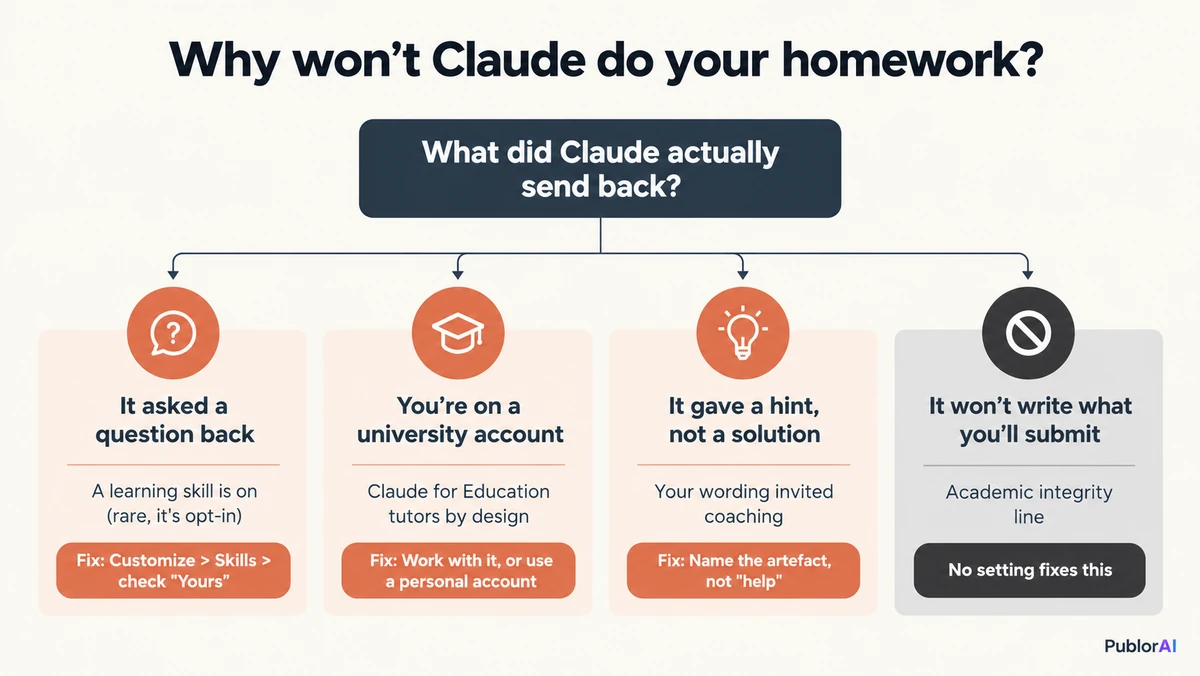
If none of those four match, and Claude dropped the topic entirely rather than steering you through it, you are looking at the safety classifier instead and this is the wrong page. The guide to clearing false refusals covers that one.
Step 2: Ask for the Artefact, Not for Help
This is the fix for most people and it takes one rewrite. “Help me with question 3” is an open invitation to coach you, and Claude takes it every time. Name the thing you want produced and you get that thing instead.
Compare these pairs. Each asks about the same problem and lands completely differently:
- Gets you a hint: “Can you help me with this integral?”
- Gets you the solution: “Solve this integral and show every step, then explain the step most people get wrong.”
- Gets you a hint: “I’m stuck on this essay about the causes of the First World War.”
- Gets you something usable: “Outline this essay in five paragraphs with the argument of each, then write the opening paragraph as a model I can study.”
The second version of each names a specific artefact: a worked solution, an outline, a model paragraph. That is the whole trick, it needs no settings, and it works on every assistant rather than just this one. It is the same principle behind writing better prompts generally. Say what you want to exist at the end of the reply.
Step 3: When It’s the Integrity Line, Not a Setting
Some requests get declined and stay declined. The clearest is asking Claude to write a finished piece of work for you to submit under your own name. That is an academic-integrity position rather than a safety filter, and rewording it is a waste of your evening.
What works instead is asking for everything around the work rather than the work itself. An outline you fill in. A model answer to a similar question. Feedback on the draft you already wrote. An explanation of where your reasoning went wrong. You end up with more to study from and you stay out of a conversation with your department that nobody enjoys. Where that line actually sits is genuinely contested, and I went through the arguments in is using AI for schoolwork cheating.
This is also the case most people are actually in when they search for Claude refusing to do homework, which is why no setting in this guide will change it.
Step 4: If You’re Using a University Account
Check where your Claude account came from before assuming something is broken. Claude for Education is deployed campus-wide at institutions including Northeastern, the London School of Economics, Champlain College, Syracuse and the University of San Francisco School of Law, and tutoring is the point of it rather than a side effect.
Anthropic describes it plainly on its education page: it works “like a good tutor: it asks questions that help you find the answers yourself.” Northeastern even publishes its own student guide to studying with it, which tells you how deliberate this is. The behaviour students read as Claude refusing to do homework is the behaviour the university actively chose.
If a tutor-style tool is what your institution bought, working with it is usually faster than working around it. The answer you extract at midnight is worth very little in an exam hall.
Step 5: Check Whether a Learning Skill Is Switched On
This is the step that used to be first, and it has quietly become the least likely. Claude’s old style dropdown, with Normal, Concise, Explanatory, Formal and Learning in it, is no longer how the web app works. That behaviour moved into skills, and the Learning one is opt-in.
To check yours, open Customize in the left sidebar, stay on the Skills tab, and search for learning. Anything already active appears under Yours at the top. Everything under More you can add is not running and is not affecting your replies.
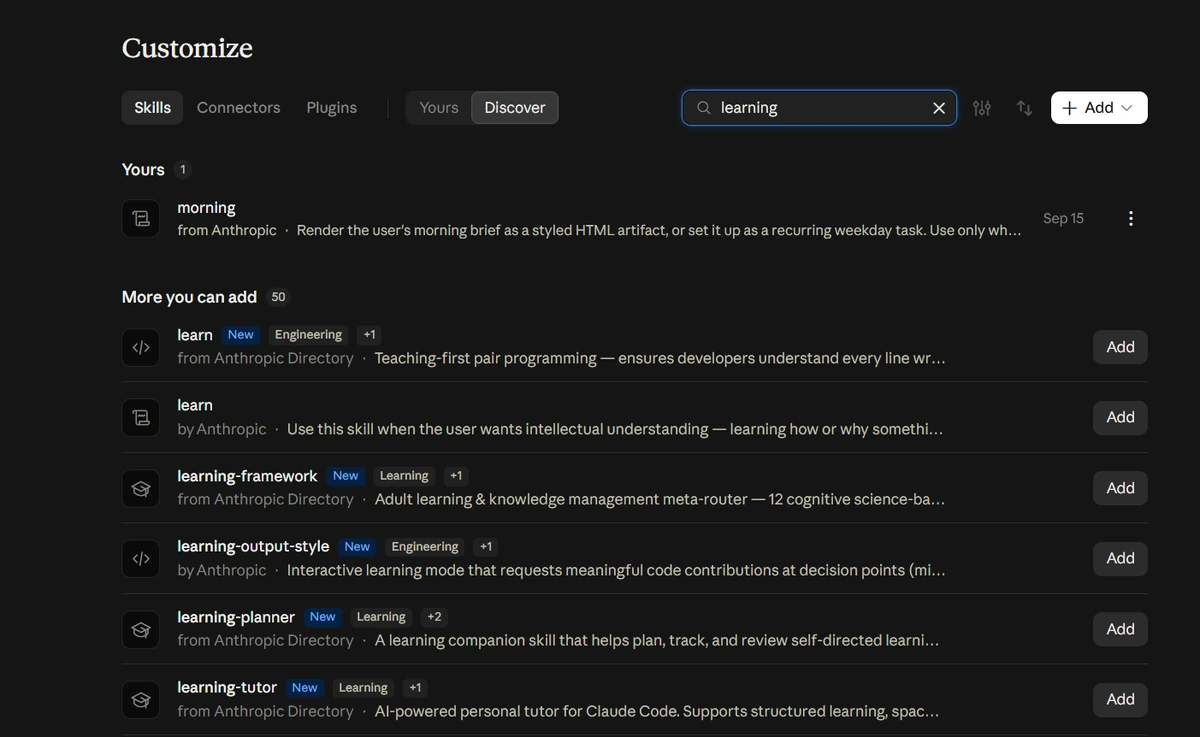
When I checked a normal Pro account while writing this, Anthropic’s learning-output-style skill sat in the “more you can add” list, unadded, and its description is about requesting code contributions at decision points rather than homework. So if you are on a personal account and nobody added it, this is almost certainly not your problem, whatever the older guides say. In Claude Code the equivalent control does still exist as /output-styles, and a change there needs /clear or a new session to take effect.
Mistakes That Keep Claude Refusing to Do Homework
Five habits keep people stuck, and the first two come from advice that used to be right.
- Hunting for a style dropdown that no longer exists. Most guides still tell you to open the style picker and set it to Normal. There is no style picker in the web app now. Skip straight to Step 2.
- Looking in the Output menu. The Output dropdown under the message box sets the artifact format, offering Claude Docs, Slides and Design. It has nothing to do with how Claude answers.
- Arguing with a teaching reply. Telling Claude “just give me the answer” works far less reliably than asking for a named artefact in a fresh message.
- Reading a model switch as a refusal. If the reply came from a different model than the one you picked, a safety classifier moved you and nothing is broken. That is the model switch, not a homework block.
- Blaming the filter for a usage limit. A countdown and a time you can continue is a usage limit, which no prompt and no setting will clear.
Using Claude Without Fighting It
The short version: read the reply before you blame the model, name the artefact you want instead of asking for help, and accept that the one genuine refusal here is the one you should not be trying to get around anyway. Those three moves cover almost every case of Claude refusing to do homework, and none of them involves a settings page.
The part worth sitting with is that the tutoring behaviour is not a bug anyone intends to fix. Anthropic built it deliberately, universities bought it deliberately, and the version of it in Claude Code goes out of its way to leave gaps in your code for you to fill. The useful question is not how to switch it off. It is which of your assignments you will be examined on later without a laptop in the room, because those are the ones where being made to work it out is the point.