Last reviewed: May 15, 2026.
Note: This comparison is for informational purposes only. Pricing and features change frequently. Always check the official sites for Claude and Figma before purchasing.
Claude Design vs Figma is the design world’s most-debated matchup of 2026. Anthropic launched Claude Design on April 17, 2026, and tech media immediately called it a Figma killer. I tested both for two weeks on real work: prototypes from prompts, production UI, pitch decks, and design-system consistency. The honest verdict: they are not actually competitors. Claude Design is the fastest way to go from a text prompt to a working prototype, and its design-system ingestion is genuinely impressive. Figma is still the production environment where real UI/UX, team collaboration, and developer handoff happen. Claude Design wins on speed from idea to clickable mockup. Figma wins on everything that comes after. For a solo founder or PM who needs a prototype today, Claude Design at $20/month (via Claude Pro) is the smarter buy. For a design team shipping production work, Figma at $16/seat is non-negotiable. Most serious teams in 2026 use both.
The Quick Verdict (Who Should Use Which)
If you want the answer before the detail:
- Pick Claude Design if you’re a founder, PM, or solo builder who needs to go from idea to clickable prototype or pitch deck fast, without learning a design tool
- Pick Figma if you’re a designer or team shipping production UI/UX, need real collaboration, design systems, vector editing, or developer handoff
- Use both if you’re a serious product team: Claude Design for rapid exploration, Figma for production. This is what most teams actually do in 2026
The Claude Design vs Figma debate gets framed as “which one wins” but they solve different problems. The real question is which one solves YOUR problem, covered below.
What Claude Design Actually Is
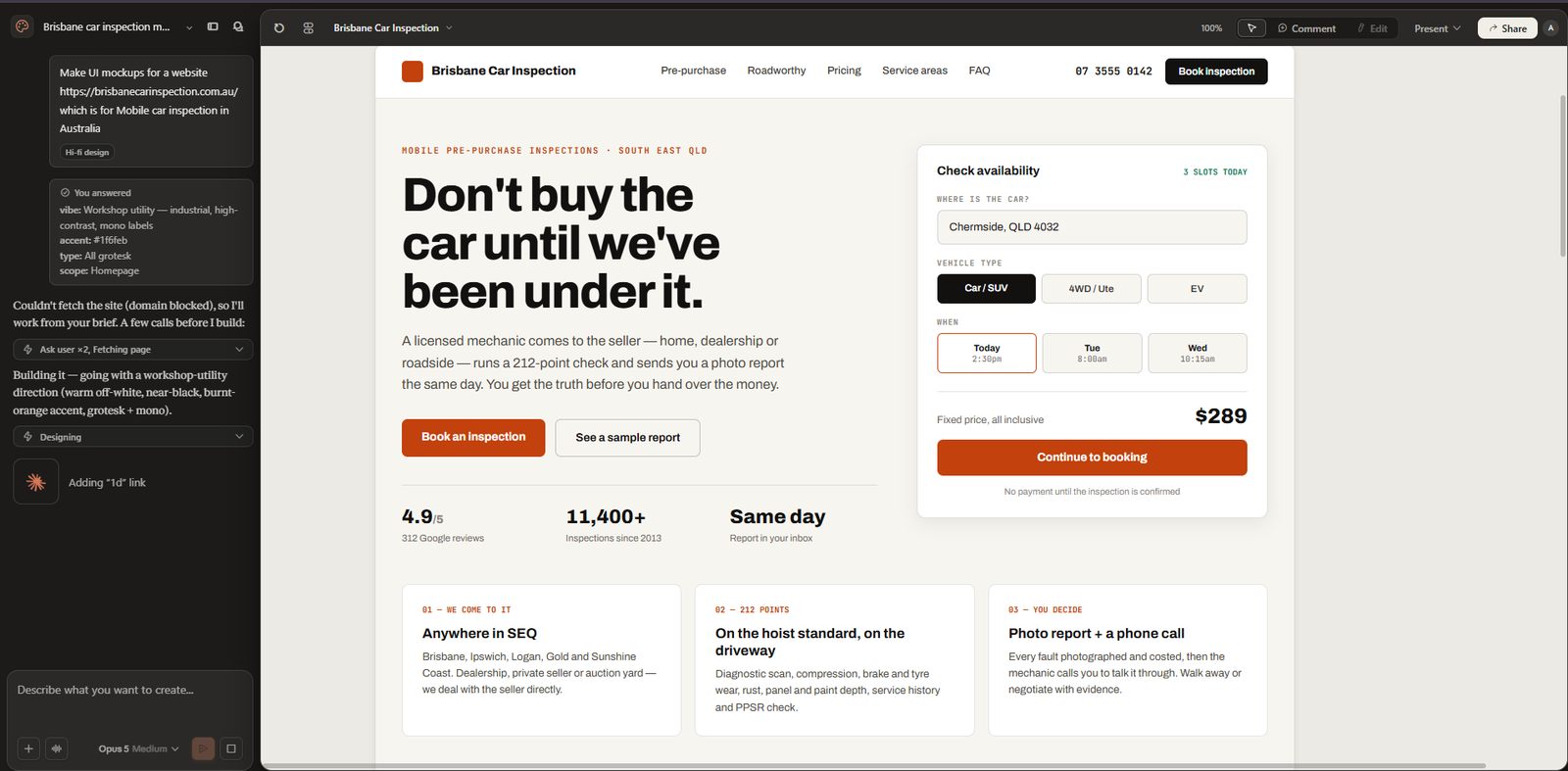
Claude Design is Anthropic’s AI design tool, released in research preview on April 17, 2026 and powered by Claude Opus 4.7. You describe what you want in plain text (a pricing page, a dashboard, a pitch deck) and Claude writes the HTML, CSS, and JavaScript to render it live in a preview panel.
The standout feature is design-system ingestion. During onboarding, Claude scans your codebase and existing design files to learn your brand tokens, components, and voice, then applies that system to everything it generates afterward. Output bundles drop straight into Claude Code for production. If you want the full background, our explainer on what Claude Design is covers it from scratch, and our Claude Opus 4.7 review covers the model powering it.
What Figma Actually Is
Figma is the industry-standard professional design tool. It’s where product designers, UX researchers, and frontend engineers collaborate on production-ready UI work. It has mature component libraries, design systems with tokens, real-time multiplayer collaboration, vector editing, version history, a huge plugin ecosystem, and proper developer handoff with measurements and code annotations.
Figma also has its own AI now. Figma Make is its prompt-to-prototype feature, and it even lets you pick between Anthropic’s Claude models and Google’s Gemini models under the hood. So the Claude Design vs Figma comparison in 2026 is partly Anthropic’s AI-first tool versus Figma’s AI bolted onto a mature design platform.
Three Real Use Cases I Tested
Use Case 1: Idea to Clickable Prototype (Fastest Win)
I gave both the same prompt: “Build a clickable prototype for a habit-tracking app with onboarding, a home dashboard, and a streak screen.”
Claude Design produced a working, navigable prototype in about 4 minutes. It was rough but real, and I could click through it immediately. Figma Make produced something comparable but took longer to set up and required me to already be inside a Figma project. For pure speed from text to clickable mockup, Claude Design won clearly.
Use Case 2: Production UI With a Design System
Production work is the area where Figma’s maturity shows. I needed to take a prototype to production-ready UI with a real design system, proper component variants, and developer handoff. Figma handled this cleanly. Claude Design generated good-looking output but lacked persistent components, named version snapshots, precise vector control, and the handoff annotations engineers need. For production UI/UX work, Figma is still the better environment, not close.
Use Case 3: Pitch Deck and Landing Page
I asked both for a 10-slide pitch deck and a SaaS landing page. Claude Design was noticeably faster and the output was on-brand once it had ingested my design tokens. Figma required more manual layout work. For founders and PMs who need a polished deck or landing page today, Claude Design is the faster path.
Claude Design vs Figma: Feature Comparison
| Feature | Claude Design | Figma |
|---|---|---|
| Prompt to prototype speed | Fastest (minutes) | Slower (Make is decent) |
| Design system ingestion | Excellent (scans codebase) | Strong (manual setup) |
| Real-time team collaboration | No | Yes (industry-leading) |
| Vector editing precision | Limited | Full professional control |
| Developer handoff | Code bundle to Claude Code | Measurements, annotations, specs |
| Version history / snapshots | Limited | Named, full history |
| Plugin ecosystem | None yet | Massive |
| Learning curve | Near zero (just chat) | Real (designer tool) |
| Best for | Speed, prototypes, decks | Production UI, teams, systems |
Pricing: Claude Design vs Figma
This matters more than the feature list for most buyers, so here’s the real money breakdown in USD.
| Plan | Claude Design | Figma |
|---|---|---|
| Free tier | Limited (free Claude account) | Yes (individual, limited) |
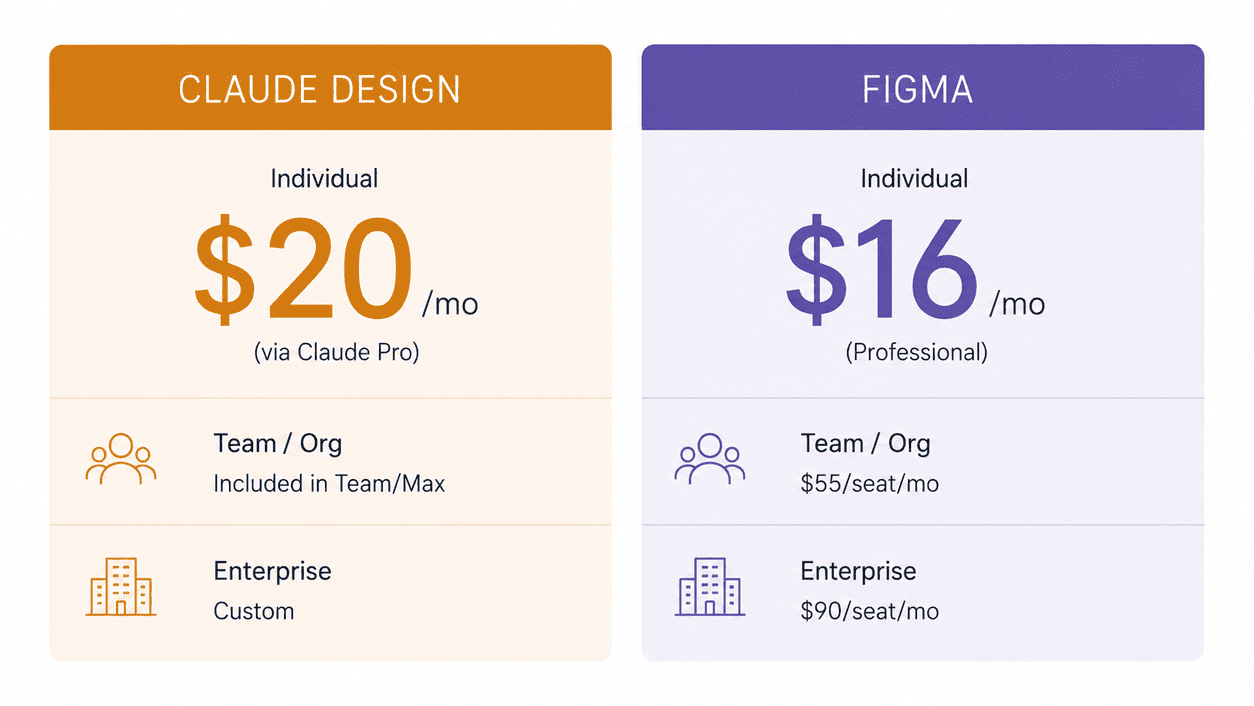
| Individual paid | $20/month (Claude Pro, includes Design) | $16/month (Professional full seat) |
| Team / Org | Included in Claude Team/Max | $55/seat/month (Organization) |
| Enterprise | Claude Enterprise (custom) | $90/seat/month |
| What you pay for | The whole Claude ecosystem | Dedicated design platform |
The key value insight: Claude Design isn’t a standalone purchase. It’s bundled into Claude Pro at $20/month, which also gets you Claude Opus 4.7 for writing, coding, and research. If you already pay for Claude Pro, Claude Design costs you nothing extra. Figma’s $16/month is design-only. For a solo person who wants AI design plus a general AI assistant, the Claude bundle is the better dollar.
Where Each One Wins in the Claude Design vs Figma Matchup
Claude Design wins on:
- Speed from text prompt to working prototype (minutes, not hours)
- Design-system ingestion from an existing codebase
- Zero learning curve (if you can describe it, you can build it)
- Value bundling (free with the $20 Claude Pro you may already pay for)
- Closing the loop into production code via Claude Code
Figma wins on:
- Production UI/UX work that ships to real users
- Real-time multiplayer team collaboration
- Mature design systems with components and tokens
- Precise vector editing and illustration
- Developer handoff (measurements, specs, annotations)
- Plugin ecosystem and version history
Who Should Use Which (Honest Recommendations)
Use Claude Design if you’re:
- A startup founder who needs a prototype to show investors this week
- A product manager mocking up a feature to align the team
- A solo builder or indie hacker without design training
- Already paying for Claude Pro and want design as a free bonus
Use Figma if you’re:
- A professional product or UX designer shipping to production
- On a team that needs real-time collaboration
- Maintaining a design system across many screens and products
- Doing work that requires precise vector control or developer handoff
For most serious product teams, the honest answer in 2026 is both: Claude Design for the fast first 80% of exploration, Figma for the production-grade last 20% that actually ships. If you’re earning from design work, our guide to AI side hustles in 2026 covers how designers are charging $50-$150/hour using exactly these tools.
Frequently Asked Questions
Is Claude Design better than Figma?
The Claude Design vs Figma answer depends on the job. For raw speed from a text prompt to a working prototype, yes, Claude Design is faster and easier. For production UI/UX, design systems, team collaboration, and developer handoff, Figma is clearly better. They are not really competitors. Claude Design is a prototyping accelerator; Figma is a production design platform.
Will Claude Design replace Figma in 2026?
No, not in 2026. Claude Design replaces the early, messy prototyping phase. It does not replace Figma’s production environment, collaboration, or design-system tooling. The realistic outcome is teams using Claude Design earlier in the process and Figma later, not abandoning Figma.
How much does Claude Design cost vs Figma?
Claude Design is bundled into Claude Pro at $20/month (no separate purchase, and you also get Claude Opus 4.7 for writing and coding). Figma’s Professional plan is $16/month per full seat, Organization is $55, Enterprise is $90. For a solo user wanting AI design plus a general AI assistant, Claude Pro is the better-value $20. For the full picture across the category, see our roundup of the best AI design tools of 2026.</p
Can Claude Design read my existing design system?
Yes, and it’s the standout feature. During onboarding, Claude Design scans your codebase, CSS files, Figma exports, or screenshots and learns your brand colors, typography, and components, then applies that system consistently to everything it generates. This is something Figma Make does not do as cleanly.
Is Claude Design good for production UI work?
Not yet. Claude Design is excellent for prototypes, pitch decks, and exploration. For production UI that ships to real users (with proper components, version history, handoff specs, and team collaboration), Figma remains the better environment in 2026.
Does Figma have its own AI like Claude Design?
Yes. Figma Make is Figma’s prompt-to-prototype AI feature, and it even lets you choose between Anthropic Claude and Google Gemini models. It’s solid for teams already in Figma, but Claude Design is faster for pure prompt-to-prototype and stronger at design-system ingestion.
Claude Design vs Figma: My Final Verdict
After two weeks of testing both on real work, my honest scoring: Claude Design is a 9/10 for speed and prototyping, and Figma is a 9/10 for production design and teams. They win at different things, and the “Figma killer” framing in tech media is overblown.
If you’re choosing where one $20 goes and you’re a solo founder, PM, or builder who needs prototypes and decks fast, Claude Design (via Claude Pro) is the smarter buy because you also get a full AI assistant. If you’re a working designer or on a product team that ships UI, Figma’s $16/seat is non-negotiable and Claude Design won’t replace it.
What I’d tell a friend: if you have to pick one, pick based on your actual job. Builders and founders, start with Claude Design. Designers and teams, stay with Figma and add Claude Design for the fast exploration phase. The strongest 2026 setup uses both, and they cost a combined $36/month, which is trivial against what good design work earns.
For more on the AI tool landscape, see our guide to the best free AI tools in 2026 and our Lovable vs Bolt vs v0 comparison if you also need to turn designs into working apps.