Last reviewed: May 16, 2026.
Note: This guide is for informational purposes only and is not financial advice. Pricing and features change frequently. Always confirm current plans on each tool’s official site, such as Figma and Adobe Firefly, before subscribing.
The best AI design tools in 2026 are not a single winner, they are a stack. After testing nine of them for two weeks on real work (UI mockups, pitch decks, social graphics, and landing pages), my honest finding is that the right pick depends entirely on your role and budget. Figma is still the production standard for product teams at $16 per full seat. Canva is the best all-around choice for non-designers, with a genuinely useful free plan. Claude Design is the fastest way to turn a sentence into a working prototype. Midjourney produces the strongest standalone visuals. For pure UI generation, Google Stitch (formerly Galileo AI) and Uizard lead. Most professionals I know run two or three of these together rather than betting on one. This guide ranks all nine, with real USD pricing and the exact use case each one wins.
Quick Verdict: The Best AI Design Tools at a Glance
If you only want the short answer, here are the best AI design tools for the most common needs:
- Best overall for product teams: Figma (production UI, collaboration, $16/seat)
- Best all-around for non-designers: Canva Magic Studio (free plan is genuinely usable)
- Best for fast prototypes from a prompt: Claude Design (bundled with Claude Pro at $20/month)
- Best for high-quality visuals: Midjourney ($10/month entry)
- Best free option: Microsoft Designer (free, no trial limit)
- Best for pure UI generation: Google Stitch and Uizard
The 9 Best AI Design Tools (Quick List)
If you want the full list first and the detail later, here are all nine in order:
- Figma AI: the production standard for UI/UX and team design
- Canva Magic Studio: best all-around for non-designers and marketing
- Claude Design: fastest prompt-to-prototype, built by Anthropic
- Adobe Firefly: the commercial-safe choice inside the Adobe ecosystem
- Midjourney: the highest-quality image and concept generator
- Uizard: sketch or screenshot to interactive UI in minutes
- Google Stitch: text-to-UI generation (the old Galileo AI)
- Framer AI: prompt to a live, publishable website
- Microsoft Designer: the best genuinely free graphics tool
Full breakdown of each one, with pricing and who it is for, below.
The Best AI Design Tools Reviewed
1. Figma AI: Best for Product Teams
Figma is still the professional standard, used in roughly 85% of Fortune 500 companies and rated 4.7/5 on G2. Its AI layer (Figma Make) generates complete interactive prototypes from natural language, and its model picker even lets you choose between Anthropic’s Claude models and Google’s Gemini models under the hood.
Pricing (USD): Professional is $16 per full seat per month. Organization is $55 per full seat per month (annual), with cheaper Dev and Collab seats that cut real cost by 10-30% if you allocate them properly.
My take: nothing else comes close for production UI, design systems, and developer handoff. The AI features are good but not why you pay, you pay for the mature platform around them.
2. Canva Magic Studio: Best All-Around for Non-Designers
Canva remains the best choice if you are not a designer. Magic Studio handles most marketing needs with zero design knowledge, and the template library covers virtually every use case.
Pricing (USD): the free plan is genuinely useful. Canva Pro is $15/month or $120/year. Canva Teams is $10/user/month with a 3-user minimum (so $30/month to start).
My take: for social posts, presentations, and marketing collateral, Canva is the safest pick for most people and small businesses. It is the tool I recommend to anyone who says “I just need something that looks good fast.”
3. Claude Design: Best for Fast Prototypes
Claude Design is Anthropic’s AI design tool. You describe what you want and it builds a working prototype, deck, or landing page you refine by chatting. Its standout feature is design-system ingestion: it reads your existing CSS files, Figma exports, or screenshots and applies your brand consistently.
Pricing (USD): no standalone price. It is bundled into Claude Pro at $20/month (also in Max, Team, and Enterprise), with a weekly usage budget that can run out fast on heavy days.
My take: the fastest idea-to-mockup tool I tested, and a strong reason it earns a spot among the best AI design tools this year. It is not a Figma replacement for production work. For the full breakdown, see our guide to what Claude Design is and our hands-on Claude Design vs Figma test.
4. Adobe Firefly: Best for Commercial-Safe Assets
Adobe Firefly offers the strongest IP and commercial-safety guarantees of any generative tool here, which matters if you ship client work.
Pricing (USD): Firefly Standard is $9.99/month (unlimited standard image and vector generation, 2,000 video/audio credits). Firefly Pro is $19.99/month and includes Photoshop on web and mobile plus 7,000 credits. It is also bundled in Creative Cloud plans ($20-60/month).
My take: if you already live in Adobe or you need legal peace of mind on commercial output, Firefly is the rational choice. The Photoshop bundle at $19.99 is the value pick.
5. Midjourney: Best for High-Quality Visuals
Midjourney still produces the most striking standalone images and concept art of anything I tested. It is not a layout or UI tool, it is a visual generator you feed into the others.
Pricing (USD): no free plan (the trial was removed in late 2024). Basic is $10/month, Standard $30/month, Pro $60/month, Mega $120/month.
My take: use it for hero images, mood boards, and concept exploration, then bring the output into Canva or Figma for layout. The $10 Basic plan is enough for most individuals.
6. Uizard: Best Sketch-to-UI Tool
Uizard turns hand-drawn sketches, wireframes, or screenshots into working, interactive UI prototypes. It is built for non-designers and product teams who need testable layouts quickly.
Pricing (USD): there is a free plan. Pro lands around $20/month per seat for the higher generation limits most teams need.
My take: the fastest way to get from a napkin sketch to something clickable. Great for early validation, not for final production design.
7. Google Stitch: Best for Text-to-UI Generation
This is the tool most 2026 roundups still get wrong. Galileo AI was acquired by Google and relaunched as Google Stitch in mid-2025. It generates UI from a text prompt or an image, with export to code.
Pricing (USD): a free tier (around 20 generations/month), with paid plans historically around $19/month (Standard) and $39/month (Pro). Confirm current Google Stitch pricing, as the plans shifted after the Google acquisition.
My take: strong for generating a first UI draft from a description. The Google backing makes its roadmap one to watch closely this year.
8. Framer AI: Best for Prompt-to-Website
Framer turns a prompt into a live, publishable website, not just a mockup. It blends AI generation with a real production web builder.
Pricing (USD): Free ($0, Framer subdomain and branding, full design and AI tools). Basic $10/month (custom domain), Pro $30/month, Scale $100/month, Enterprise custom.
My take: the best option if your goal is a shipped marketing site, not a design file. For turning designs into working apps instead, compare our Lovable vs Bolt vs v0 breakdown.
9. Microsoft Designer: Best Free Tool
Microsoft Designer is the strongest genuinely free option. It does AI image generation, auto layouts, template suggestions, and drag-and-drop editing, and integrates with Word, PowerPoint, and OneDrive.
Pricing (USD): free, with 15 AI credits per month. Microsoft 365 subscribers get 60 credits per month shared with Copilot.
My take: if your budget is exactly zero and you mostly need social and marketing graphics, start here before paying for anything. For more no-cost options, see our roundup of the best free AI tools in 2026.
Best AI Design Tools 2026: Comparison Table
| Tool | Best For | Free Plan | Paid From (USD) |
|---|---|---|---|
| Figma AI | Production UI / teams | Limited | $16/seat/mo |
| Canva Magic Studio | Non-designers / marketing | Yes (useful) | $15/mo |
| Claude Design | Fast prototypes | No | $20/mo (Claude Pro) |
| Adobe Firefly | Commercial-safe assets | Limited | $9.99/mo |
| Midjourney | High-quality visuals | No | $10/mo |
| Uizard | Sketch to UI | Yes | ~$20/mo |
| Google Stitch | Text-to-UI | Yes (limited) | ~$19/mo |
| Framer AI | Prompt to live site | Yes | $10/mo |
| Microsoft Designer | Free graphics | Yes (best free) | Free |
How to Choose the Best AI Design Tool for You
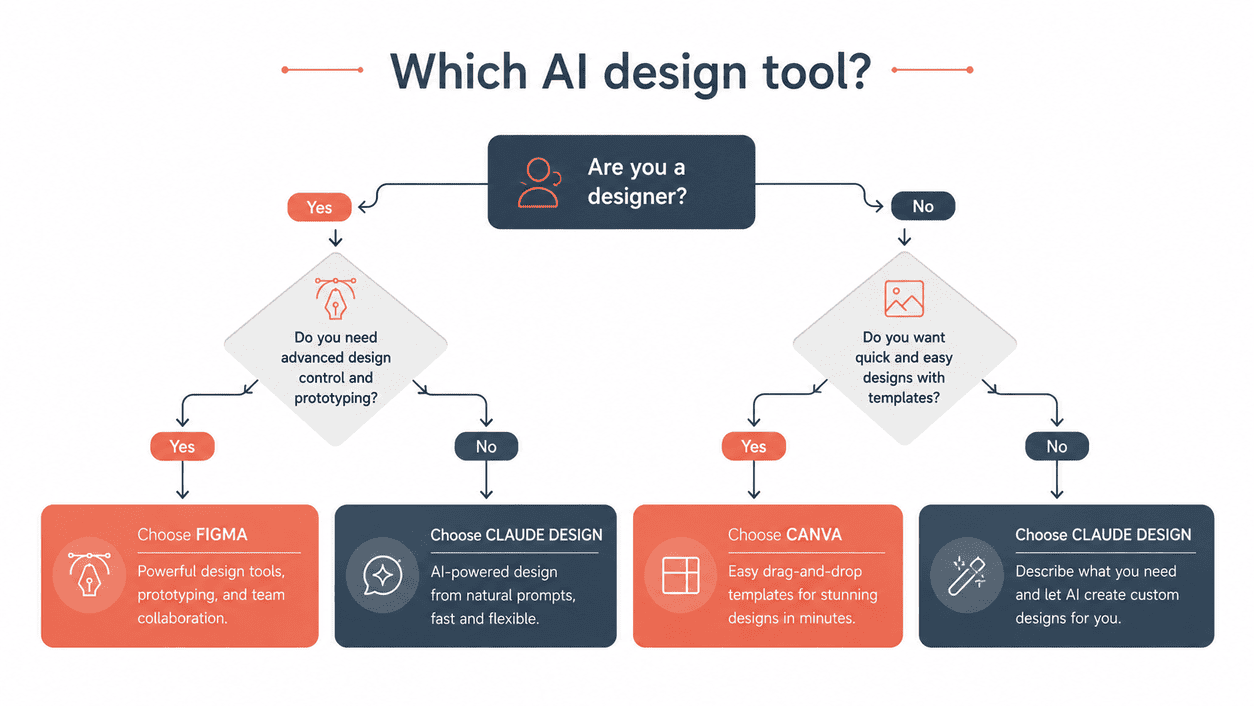
Instead of one winner, match the tool to your role. This is the framework I use:
- You are a founder or PM: Claude Design for instant prototypes and decks, plus Canva for anything client-facing
- You are a product designer or team: Figma as the core, with Midjourney for visual assets
- You run marketing: Canva Magic Studio as the base, Adobe Firefly for commercial-safe imagery
- You are a solo creator on a budget: Microsoft Designer (free) plus Midjourney Basic ($10) covers almost everything
- You need a shipped website: Framer AI, not a design-file tool
The honest reality from testing all nine: the best AI design tools are not one product, they are the right stack for your job. Most professionals pay for two, a generator and a layout or production tool, and use free tools to fill the gaps. If you want to turn these skills into income, our guide to how to make money with AI in 2026 covers how designers charge $50-$150/hour using exactly this stack.
Frequently Asked Questions
What is the best AI design tool in 2026?
For product teams, Figma is the best AI design tool because of its mature platform and $16/seat pricing. For non-designers, Canva Magic Studio wins on its usable free plan. There is no universal winner, the best tool depends on whether you need UI, marketing graphics, or fast prototypes.
Are there free AI design tools worth using?
Yes. Microsoft Designer is the strongest fully free option, and Canva, Framer, Uizard, and Google Stitch all have genuinely useful free tiers. You can build a capable design workflow in 2026 without paying anything, especially for marketing and prototyping.
What is the best AI tool for UI design?
For production UI, Figma leads. For generating a first UI draft from a prompt, Google Stitch (formerly Galileo AI) and Uizard are the fastest. Claude Design is best when you want a clickable prototype rather than an editable design file.
Can AI replace graphic designers?
Not in 2026. The best AI design tools speed up production and remove grunt work, but they still need a human for taste, brand strategy, and final polish. The designers doing best are the ones using these tools to work faster, not the ones ignoring them.
Is Claude Design better than Figma?
They solve different problems. Claude Design is faster for going from a prompt to a working prototype. Figma is better for production UI, collaboration, and developer handoff. Many teams use both. Our Claude Design vs Figma test covers this in detail.
What AI design tool do professionals use?
Most professionals run a stack, not one tool. The best AI design tools used together in a common 2026 setup are Figma for product design, Midjourney for visuals, and Canva for marketing collateral, with Claude Design added for rapid early prototyping.
Final Verdict
After two weeks of testing, my honest conclusion is that the best AI design tools in 2026 are the ones that fit your specific job, not the one with the longest feature list. Figma is non-negotiable for product teams. Canva is the safest pick for everyone else. Claude Design is the speed champion for prototypes. Midjourney owns visual quality. And Microsoft Designer proves you do not have to pay anything to start.
If I had to spend one budget today as a solo professional, it would be Claude Pro at $20/month (for Claude Design plus a full AI assistant) and Midjourney Basic at $10/month, with Microsoft Designer and Canva’s free tiers covering the rest. That is a complete design stack for $30/month, which is trivial against what good design work earns in the US market. If your work bleeds into motion or video, pair this stack with our tested guide to the best AI video generator in 2026 to round it out.
New to AI tools in general? Start with our best free AI tools guide, then come back and build the paid stack that fits your work.