There are a handful of things you should never tell ChatGPT, and the reason is simple. Anything you type can be stored, reviewed by a human, and used to train future versions of the model unless you change your settings. I treat the chat box like a postcard, not a diary, because anyone in the delivery chain could read it. After using these tools every day for work, the seven categories below are the ones I keep out of every prompt: personal identifying details, passwords, financial information, government ID numbers, confidential work data, private medical information, and other people’s personal data. None of this means ChatGPT is unsafe to use. It means you use it the way you’d use any online service, by keeping the genuinely sensitive stuff out of the box. Here is each one, why it matters, and the safer way to handle it.
Quick note before the list: this is not about fear. ChatGPT is genuinely useful and I use it daily. It’s about drawing one clear line between a helpful assistant and a permanent record you don’t fully control.
Where Your ChatGPT Messages Actually Go

Here is the part most people miss: by default, your ChatGPT conversations don’t vanish when you close the tab. OpenAI stores them, a subset can be reviewed by human trainers, and on a normal consumer account they can be used to improve future models unless you opt out. That’s not a scandal. It’s how most free AI tools work, and it runs on the same training loop we broke down in our explainer on how AI works.
But it does mean whatever you paste in could, in theory, sit on a server you don’t control or surface later. Two real risks stack on top of that. The first is a data breach, because any company storing data can be hacked. The second is human review, because a real person may read a flagged conversation. That is the whole reason some things should simply never go in the box. So what should you never tell ChatGPT? These seven, in order of how much damage they can do.
The 7 Things You Should Never Tell ChatGPT
If you want the list before the detail, here are the seven categories to keep out of every prompt:
- Personal identifying information (full name, address, phone, birth date)
- Passwords, PINs, and security answers
- Financial and banking details (card and account numbers)
- Government ID numbers (SSN, passport, national ID)
- Confidential work or client data (NDA material, unreleased code)
- Private medical information tied to your identity
- Other people’s personal information
Here is each one, why it’s risky, and what to do instead.
1. Personal Identifying Information
Never tell ChatGPT your full name, home address, phone number, and date of birth, especially all together. On their own these feel harmless, but combined they are exactly the bundle an identity thief needs. If that conversation is ever breached or reviewed, you’ve handed over a ready-made profile. What to do instead: keep prompts generic, and use a placeholder like “[my address]” when you need ChatGPT to format a letter or fill a template.
2. Passwords, PINs, and Security Answers
This is the one rule with no exceptions: never tell ChatGPT a password, PIN, or the answer to a security question. It gets stored in your chat history in plain readable text, so a single account breach hands an attacker the keys to everything. A chatbot is never the place to store or “remember” a login. What to do instead: use a real password manager. ChatGPT has no secure vault, and it was never built to be one.
3. Financial and Banking Details
Never tell ChatGPT your card numbers, bank account numbers, or full statements. Financial data is the highest-value target for fraud, and once it’s in a stored conversation you’ve lost control of where it lives. You can still get useful help with money questions. What to do instead: ask in general terms (“how do I build a monthly budget on a $3,000 income”) without pasting real account numbers or your actual statement.
4. Government ID Numbers
Never tell ChatGPT your Social Security number, passport number, national ID, or driver’s license number. These are worse than a password for one reason: you can’t easily change them. A leaked password takes two minutes to reset; a leaked national ID can follow you for years. What to do instead: leave them out entirely, and redact them as “[ID number]” if a document you’re drafting references one.
5. Confidential Work or Client Data
Never tell ChatGPT your company’s unreleased code, internal documents, client lists, or anything under an NDA on a personal account. It’s one of the most common and costly mistakes people make. You may be breaching that NDA the moment you hit enter, and you’re exposing data that isn’t yours to share. Several big companies, including Samsung, reportedly restricted internal ChatGPT use after employees pasted confidential code into it. I almost did the same with a client contract once and caught myself halfway through. What to do instead: use a business or enterprise account (those don’t train on your data), or strip out names and specifics and ask about the general problem. For safe work prompts that don’t leak anything, see our guide to the best ChatGPT prompts for work.
6. Private Medical Information
Never tell ChatGPT about diagnoses, test results, prescriptions, or mental-health details tied to your real identity. ChatGPT is not your doctor and, for a consumer account, it isn’t covered by the medical-privacy protections you’d get in a clinic. Health data is deeply personal and a prime breach target. What to do instead: ask general health questions without identifying yourself, and take anything important to an actual professional. The model can explain a term; it can’t safely hold your medical record.
7. Other People’s Personal Information
The last one is the easiest to forget: never tell ChatGPT other people’s private details either, whether it’s your kids, your partner, a coworker, or a client. When you paste someone else’s information, you’re making a privacy decision for a person who never agreed to it. What to do instead: anonymize them (“my coworker” instead of a real name), get their okay first, or simply leave the identifying parts out.
What to Do Instead: How to Use ChatGPT Safely
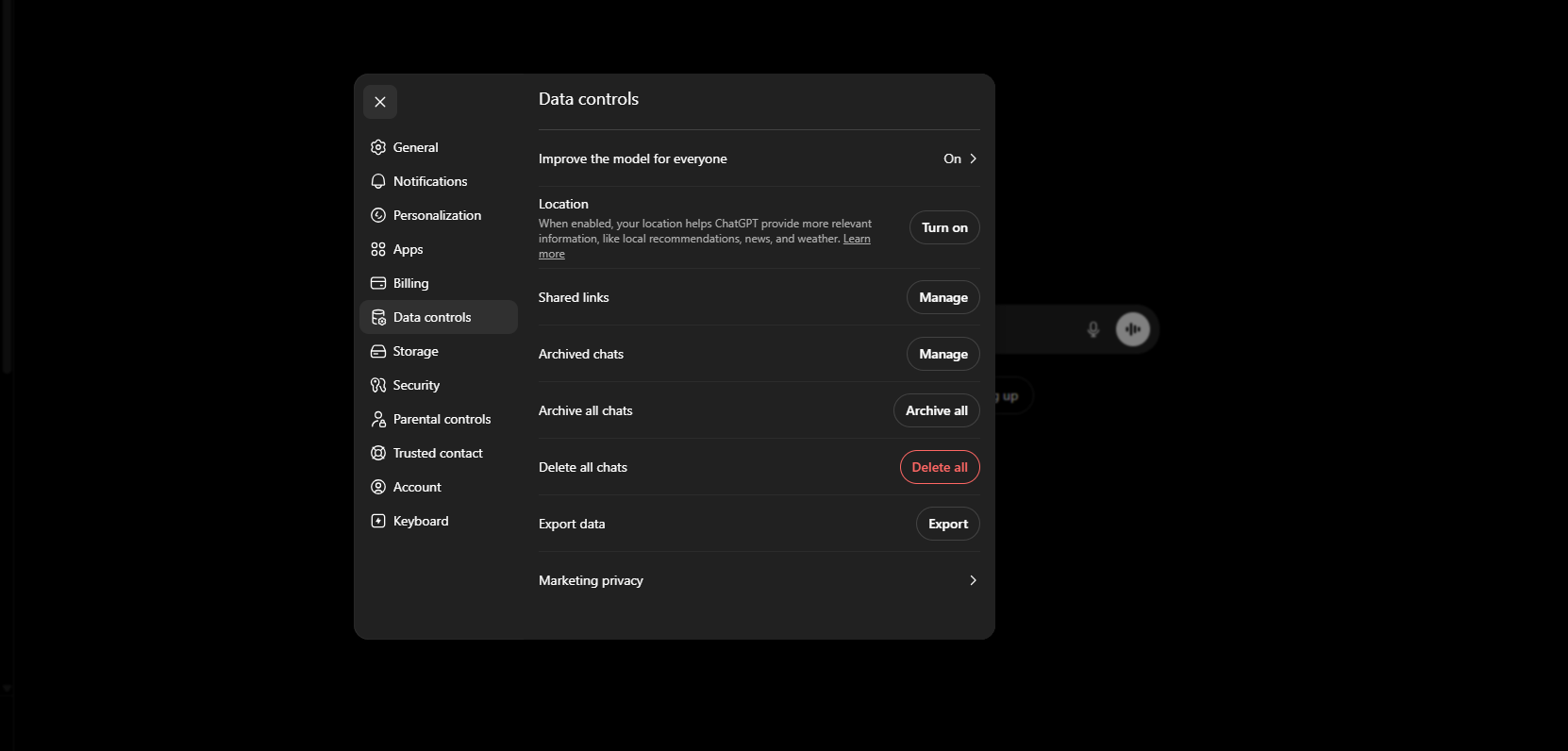
You don’t have to quit ChatGPT to stay private. You just need a few habits and one settings change. The single highest-impact move is turning off model training so your new chats aren’t used to improve the model.
| Habit | What it does |
|---|---|
| Turn off model training | Settings > Data Controls > switch off “Improve the model for everyone” so new chats aren’t used for training (OpenAI’s steps here) |
| Use Temporary Chat | For a sensitive session, start a Temporary Chat so it isn’t saved to history or used for training |
| Redact before you paste | Swap real names, numbers, and IDs for placeholders like [NAME] or [AMOUNT] |
| Use a work/enterprise account for work | Business and Enterprise plans don’t train on your data by default |
Those four habits cover almost every risk on this page. If you’re newer to the tool and want the full setup walked through, our beginner’s guide to using ChatGPT covers the settings step by step, and if you’re weighing a paid plan for work, our breakdown of ChatGPT Plus vs Free explains which tier protects your data. The habit matters even more as AI tools start acting on your behalf, which we cover in our guide to what AI agents are.
FAQ
Does ChatGPT store your conversations?
Yes. By default ChatGPT saves your chats to your history, and on a consumer account they can be used to train future models unless you turn that off in Data Controls. You can also use Temporary Chat for sessions you don’t want saved at all.
Can ChatGPT data be hacked or leaked?
Any company that stores data can suffer a breach, and OpenAI is no exception. That is exactly why you should never tell ChatGPT passwords, financial details, or ID numbers. If it isn’t in the chat, it can’t leak from the chat.
Is it safe to use ChatGPT for work?
It’s safe for general work like drafting, brainstorming, and summarizing, as long as you don’t paste confidential or client data into a personal account. For real work data, use a business or enterprise account that doesn’t train on your inputs, or anonymize the details first.
Can OpenAI employees read my chats?
A limited number of authorized reviewers can access conversations in specific cases, such as investigating abuse or improving the system. They’re not reading everyone’s chats for fun, but you should assume a sensitive message is not fully private, which is the whole point of this list.
The Bottom Line
ChatGPT is one of the most useful tools you can have, and none of this is a reason to stop using it. It’s a reason to use it the way professionals use any online service: assume the box isn’t private, and keep the seven things above out of it. Memorize the short version. Never tell ChatGPT anything you wouldn’t write on a postcard, turn off model training, and redact the rest. And if you’re wondering whether the tool itself is fair to use, here’s the honest take on whether using ChatGPT is cheating.
Do those, and you get all the upside of AI with almost none of the privacy risk. Next, if you want to actually get more out of the tool now that you’re using it safely, read our beginner’s guide to using ChatGPT and start putting it to work.