Last reviewed: June 3, 2026
This article covers a purchase and budgeting decision for paid AI subscriptions and metered API usage, from $20 a month up to enterprise spend. It is for educational purposes only, not financial or technical advice. Model pricing, benchmarks, and features in this category change fast, so confirm the current numbers on Anthropic’s official pricing page before you commit a budget or migrate a production workload.
Claude Opus 4.8 for coding is, after a week of running it on my real projects, the strongest single model I’ve used for serious software work in 2026. Anthropic shipped it on May 28, and the coding story is short: it scores 69.2% on SWE-bench Pro, the hard benchmark built on real pull requests, against 64.3% for Opus 4.7 and 58.6% for GPT-5.5, and it misses roughly 4x fewer flaws in code it writes itself. The headline feature is Dynamic Workflows in Claude Code, which lets the model fan out hundreds of parallel subagents on one task. Standard pricing held flat at $5 input and $25 output per million tokens. What surprised me most wasn’t the raw code generation, it was the code review: this model catches its own bugs far more often than 4.7 did. For working developers, it’s a clear yes. For light or hobby coding, it might be more model than you actually need.
Why I Spent a Week Coding With Only Claude Opus 4.8
I switched my whole coding workflow to Opus 4.8 for a week because the launch numbers were loud and I wanted to know what was real. The short answer: most of it holds up, and the gains you feel daily are not the ones on the benchmark chart. The question this post answers is narrow and practical, is Claude Opus 4.8 for coding actually worth building your day around, not “is it a good model in the abstract.”
For context, Anthropic released this just 41 days after Opus 4.7, the fastest model turnaround in the company’s history. If you want the full standalone breakdown of everything the model ships, we covered that in our complete Claude Opus 4.8 review. This piece is tighter and only about one thing: using Claude Opus 4.8 for coding day to day, writing, refactoring, reviewing, and shipping real code with it. I used it across four languages I work in regularly (Python, TypeScript, PHP, and a bit of Go), in Claude Code an
d through the API, on the kind of unglamorous tasks that fill an actual workday. Everything below is what I saw, not what the launch post promised.
How I Set Up Claude Opus 4.8 for Coding
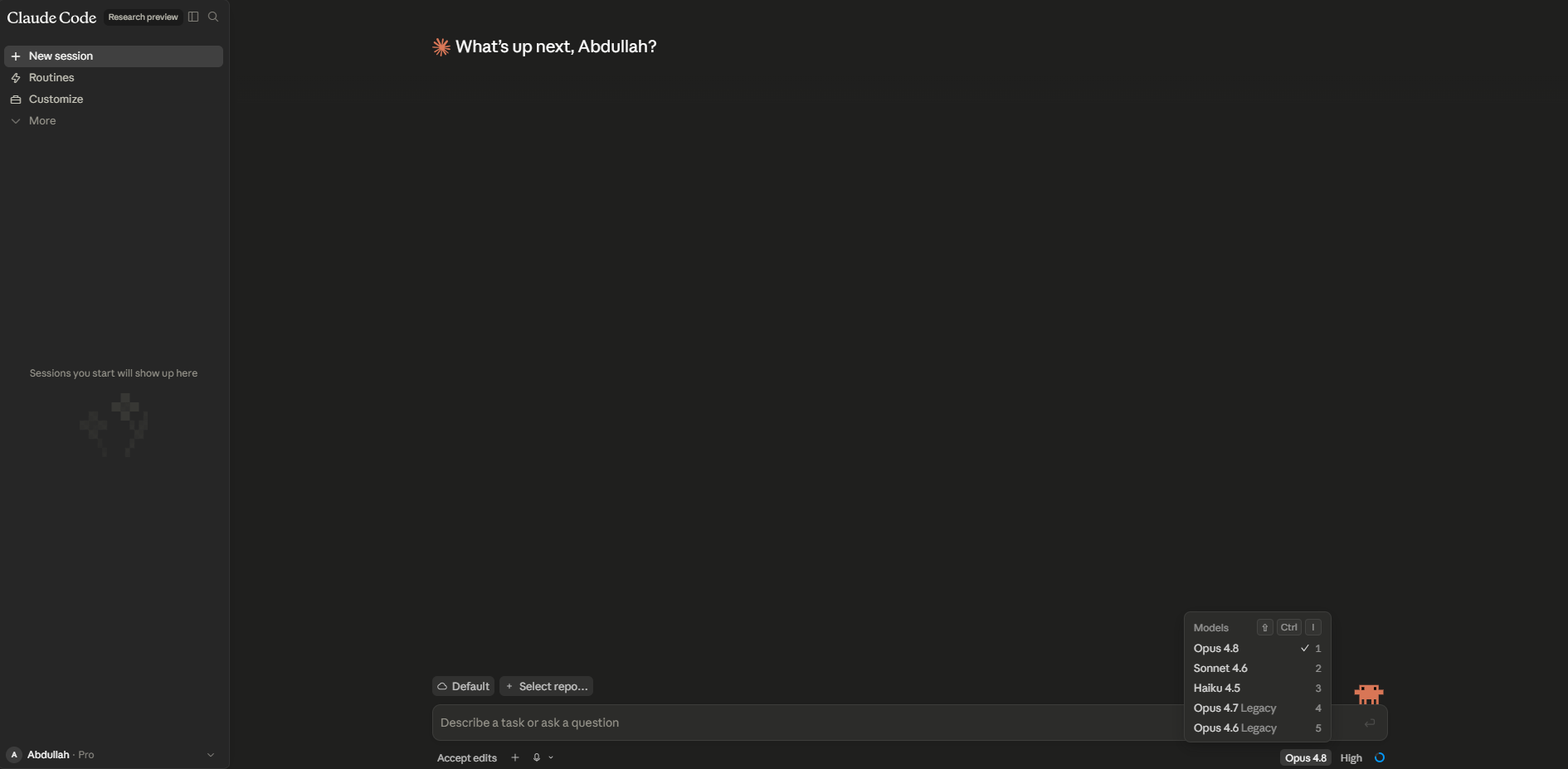
There are three realistic ways to run Claude Opus 4.8 for coding, and which one you pick changes the experience more than any setting does. You can use it inside Claude Code (Anthropic’s own terminal agent), inside an editor like Cursor through its model picker, or directly through the API in your own tooling. For everyday work I leaned on Claude Code, because that’s where the new Dynamic Workflows feature lives and where Claude Opus 4.8 for coding feels most at home.
The single setting that matters most is the effort level. Opus 4.8 exposes five: Low, Medium, High (the default), xHigh, and Max. Effort controls how aggressively the model spends tokens, which in practice controls how hard it thinks, how many tools it calls, and how many alternatives it explores. Anthropic’s own guidance is blunt about it: start with xHigh for coding and agentic work, drop to Medium for cost-sensitive routine tickets, and reserve Max for genuinely hard problems where your evals show real headroom. After a week, that maps almost exactly to what I found.
Two setup notes that the docs are right about and that bit me until I fixed them. First, when you run xHigh or Max, set a large max_tokens (64,000 is a sane starting point) or the model runs out of room mid-task and stops half-finished. Second, if you use Cursor or another IDE, confirm it actually pins claude-opus-4-8 and not an older Opus string, because the model picker labels can lag a launch by a few days. If you live in an editor rather than a terminal, our Cursor 3 review walks through how that workflow feels day to day.
Where Claude Opus 4.8 for Coding Pulled Ahead
Three things stood out where Claude Opus 4.8 for coding clearly beat what I was used to: large refactors that run themselves, code review that catches its own mistakes, and holding a big codebase in context without losing the plot. None of these are subtle. You feel them in the first afternoon.
1. Long refactors and migrations that finish in one session
The Dynamic Workflows feature is the real headline for coding. Inside Claude Code, the model can plan a large job, write its own short orchestration script, and then run up to 16 parallel subagents at once (1,000 total per run) against your test suite as the pass/fail bar. I pointed it at a framework upgrade spanning roughly 200 files, the sort of chore that used to eat a full afternoon across several sessions. It planned the work, fanned the changes out across subagents, caught two conflicts between them on its own, and finished with its own test pass in about 40 minutes. The detail that won me over: when I deliberately killed the terminal halfway through, it resumed from where it stopped instead of starting over. That one behavior is what makes long autonomous coding feel safe to actually use, and it lines up with the shift toward stateful agents we wrote about in our guide to AI agents. Dynamic Workflows ships in research preview on the Max, Team, and Enterprise plans.
2. Code review that catches its own bugs
This is the upgrade I’d pay for on its own. Opus 4.8 is roughly 4x less likely than 4.7 to let a flaw in its own code slip past unremarked, and that 4x is the most noticeable change in daily work. The test that sold me was small. I handed it a date-parsing function with a subtle timezone bug that only triggers on daylight-saving boundaries, and asked it to review and fix the code. Opus 4.7, on the same prompt last month, wrote a clean-looking rewrite that quietly kept the bug. Opus 4.8 flagged the timezone handling on the first read, asked which behavior I actually wanted, and shipped two options with the trade-offs labeled. Across the week it kept doing the boring, senior-engineer thing: flagging missing retry logic on an API call, calling out a migration script with no rollback path, pushing back instead of agreeing with whatever was in the prompt. This is the part that makes Claude Opus 4.8 for coding feel less like autocomplete and more like a second pair of senior eyes.
3. Real use of a large-codebase context window
Large-context work is where Claude Opus 4.8 for coding quietly pulls away from one-file assistants. Opus 4.8 carries the full 1M-token context window at standard pricing, and for coding that’s the difference between pasting three files and pasting the whole module. I fed it an unfamiliar 60,000-line repository and asked where a specific race condition could be coming from. It traced the call path across files instead of guessing from the one function I showed it. The model also uses a newer tokenizer (shared with 4.7) that can run up to 35% heavier on the same text, so a “1M context” prompt holds a bit less literal code than the number suggests. Worth knowing before you plan a budget around it.

Where Claude Opus 4.8 Frustrated Me as a Coding Tool
No model is all upside, and the honest limits of Claude Opus 4.8 for coding are worth saying out loud before you spend money on it. It is excellent, but it is not magic, and two things annoyed me consistently.
- It can over-engineer at high effort. At xHigh and Max, the model sometimes adds tests, edge-case handling, and abstractions nobody asked for. Great when you want a senior engineer’s instincts, less great when you wanted a three-line fix and got a small framework. For quick, scoped work, Medium is genuinely the better setting, not a downgrade.
- Cost creeps quietly on agentic runs. Because xHigh spends tokens freely and Dynamic Workflows spins up many subagents, a single ambitious task can burn far more than you’d guess. I had a refactor I expected to cost cents quietly climb because I left effort at Max and never capped
max_tokens. The model is cheap per token. It is not cheap if you let it think forever. - Terminal and CLI automation is a near tie. For pure command-line scripting and shell-heavy automation, the gap to GPT-5.5 basically disappears, and GPT-5.5 runs leaner on output tokens. If that’s most of your work, the coding case for switching is weaker. We break that matchup down in our Claude Opus 4.8 vs GPT-5.5 comparison.
The Coding Benchmarks Behind Claude Opus 4.8, Read Honestly
On published coding benchmarks, Opus 4.8 leads, but read the gaps honestly rather than just the headline. The biggest real jump is SWE-bench Pro, the agentic benchmark built on genuine pull requests, where it scores 69.2%. Everything else is a smaller step up from an already strong 4.7. Here’s the side-by-side using Anthropic’s own launch numbers.
| Coding benchmark / trait | Claude Opus 4.8 | Claude Opus 4.7 | GPT-5.5 |
|---|---|---|---|
| SWE-bench Pro (agentic, real PRs) | 69.2% | 64.3% | 58.6% |
| SWE-bench Verified | 88.6% | 87.6% | Not directly comparable |
| Missed code-flaw rate (internal) | ~4x fewer than 4.7 | Baseline | Not directly comparable |
| Parallel subagents (Claude Code) | Up to 1,000 per run | Not available | Not available |
| Context window | 1M tokens | 1M tokens | Large, leaner output |
| Terminal / CLI workflows | Strong | Strong | Slight edge |
The honest reading on the benchmarks behind Claude Opus 4.8 for coding: it wins real-world software engineering, agentic coding, and code review. GPT-5.5 keeps a small edge on terminal and CLI automation and uses fewer output tokens per task, which makes it cheaper for high-volume routine work. The +4.9 points on SWE-bench Pro over 4.7 is the headline, but the reliability gain is the thing you actually feel. For how the two Opus versions stack against each other rather than the competition, see our Opus 4.8 vs Opus 4.7 comparison, and the previous generation is covered in our Claude Opus 4.7 review.
What Claude Opus 4.8 Actually Costs to Code With
For most developers, running Claude Opus 4.8 for coding costs less per day than a coffee. Standard pricing is $5 per million input tokens and $25 per million output tokens, unchanged from 4.7, and Claude Pro at $20 a month includes Opus 4.8 access in the chat app at no extra cost. The API math only gets scary if you leave effort at Max and never cap your tokens. Here’s the breakdown from Anthropic’s published pricing.
| Tier | Input ($/1M) | Output ($/1M) | Notes for coding |
|---|---|---|---|
| Standard | $5 | $25 | Same as 4.7. The default for most coding. |
| Fast mode | $10 | $50 | 3x cheaper than 4.7’s Fast mode, 2.5x speed. Good for interactive agents. |
| Batch API | $2.50 | $12.50 | 50% off, for non-urgent jobs (bulk test generation, refactors). |
| Cache read (hit) | $0.50 | n/a | 10% of input price. Caching your repo context pays off fast. |
| Managed Agents runtime | + $0.08 per session-hour | On top of tokens, for stateful agents. | |
Anthropic’s own worked example puts a one-hour coding session that burns 50,000 input and 15,000 output tokens at $0.705 total. Turn on prompt caching so most of your repo context is a cache hit, and the same session drops to about $0.525. In a real week of fairly heavy use, Claude Opus 4.8 for coding kept me comfortably in single-digit dollars per day on the API, plus the flat $20 Pro plan for chat-style work. The one cost trap is the one I already confessed to: xHigh and Max can multiply token spend 3-5x without warning, so cap max_tokens on automated runs.
7 Tips to Get the Best Coding Results from Claude Opus 4.8
These are the seven habits that got me the most out of Claude Opus 4.8 for coding over the week. None are exotic. Together they’re the difference between “impressive demo” and “actually faster than doing it myself.”
- Match effort to the task. Low or Medium for quick fixes and classification, High for a normal mid-level ticket, xHigh for real coding and agentic work, Max only for genuinely hard problems. This single dial moves quality and cost more than your prompt does.
- Always cap
max_tokenson automated runs. Set a ceiling (start at 64k for xHigh, lower for routine work) so an over-eager session can’t quietly run up a bill. - Give it the test suite as the success bar. Dynamic Workflows and code review both get sharper when the model has tests to pass instead of your vibe-check. Point it at the tests up front.
- Cache your repo context. Prompt caching turns the expensive part of every coding request (the codebase you keep re-sending) into a 10% cache-read charge. On repeated work it’s the biggest single saving.
- Let it review before you ship. The 4x flaw-catch improvement only helps if you actually ask it to review. Make “now review this for bugs and edge cases” a standing second step.
- Down-shift to Medium for small stuff. At high effort it over-engineers. For a three-line change, Medium gives you the fix without the unsolicited framework.
- Verify the model string. Pin
claude-opus-4-8explicitly in your tooling so you’re not silently running an older Opus that a picker hasn’t updated yet.
If you’re weighing this against other coding setups rather than tuning this one, our look at AI app builders in Lovable vs Bolt vs v0 covers the no-terminal end of the spectrum.
Claude Opus 4.8 for Coding: FAQ
Is Claude Opus 4.8 good for coding?
Yes. Claude Opus 4.8 for coding is the strongest single model available right now for real software engineering, scoring 69.2% on SWE-bench Pro versus 64.3% for Opus 4.7 and 58.6% for GPT-5.5. The bigger day-to-day win is reliability: it catches roughly 4x more flaws in its own code than 4.7 did. The main exception is pure terminal and CLI automation, where GPT-5.5 stays competitive.
What effort level should I use for coding with Opus 4.8?
Start at xHigh, which is Anthropic’s own recommendation for coding and agentic work. Drop to Medium for quick or cost-sensitive tickets, use High as a balanced middle, and reserve Max for genuinely hard problems where your evals show real headroom. Whatever you pick at xHigh or Max, set a large max_tokens (around 64k) so the model has room to finish.
How much does it cost to use Claude Opus 4.8 for coding?
Standard API pricing is $5 per million input tokens and $25 per million output tokens, and a typical one-hour coding session runs about $0.70, or roughly $0.53 with prompt caching on. Claude Pro at $20 a month includes Opus 4.8 for chat-style coding. The only real cost risk is leaving effort at Max on long agentic runs without capping tokens.
Is Claude Opus 4.8 better than GPT-5.5 for coding?
For most coding work, yes. Claude Opus 4.8 for coding leads on SWE-bench Pro (69.2% vs 58.6%) and on real-world refactors, code review, and agentic tasks. GPT-5.5 keeps a small edge on terminal and CLI automation and uses fewer output tokens, which makes it cheaper for high-volume routine work. Our full Claude Opus 4.8 vs GPT-5.5 comparison covers the details.
Do I need Claude Code to code with Opus 4.8?
No, but it helps. You can run Claude Opus 4.8 for coding in any editor that supports it (like Cursor) or directly through the API. Claude Code is where the new Dynamic Workflows feature lives, which lets the model run hundreds of parallel subagents on one task, so for large refactors and migrations it’s the strongest option. For smaller edits, an IDE or the chat app is fine.
Can Opus 4.8 work on a whole codebase at once?
To a real degree, yes. It carries a 1M-token context window at standard pricing, so it can hold large modules or whole small repos in context instead of one file at a time. Keep in mind the newer tokenizer can run up to 35% heavier on the same text, so the practical amount of code that fits is a little less than the raw token number suggests.
Final Thoughts: Is Claude Opus 4.8 the Best AI Coder Right Now?
After a week, my honest verdict is that Claude Opus 4.8 for coding is the best general-purpose AI coder available in mid-2026, with one asterisk for terminal-heavy work. The benchmark lead is real but modest. The thing that changed how I work is the reliability, the model catching its own bugs and pushing back when something looks wrong, plus Dynamic Workflows turning multi-session refactors into single-session ones. If you write code for a living and already pay Anthropic, there’s no reason not to make it your default today.
The part I keep coming back to is the pace. Forty-one days between major Opus releases means “which model should I code with” is becoming a question you answer every few weeks instead of once a year. For now the answer for most developers is this one, set to xHigh, with caching on and a token cap in place. If you’re still deciding between assistants more broadly rather than tuning Claude specifically, our ChatGPT vs Claude vs Gemini comparison covers the wider picture beyond raw coding. Whichever way you land, the same pattern from our full Claude Opus 4.8 review keeps holding: the question has quietly stopped being “can AI write this code” and become “which model do I trust to write it for me.”